Push to SFTP
This is a draft supported pattern. The file transfer service can already receive, scan and route clean files. Check with the Integration Hub team whether SFTP delivery is available for your service.
Push to SFTP is a planned way for the Integration Hub to deliver your processed files to a destination SFTP server.
Use this pattern when you need to send files to a service that accepts them through SFTP.
How the pattern works
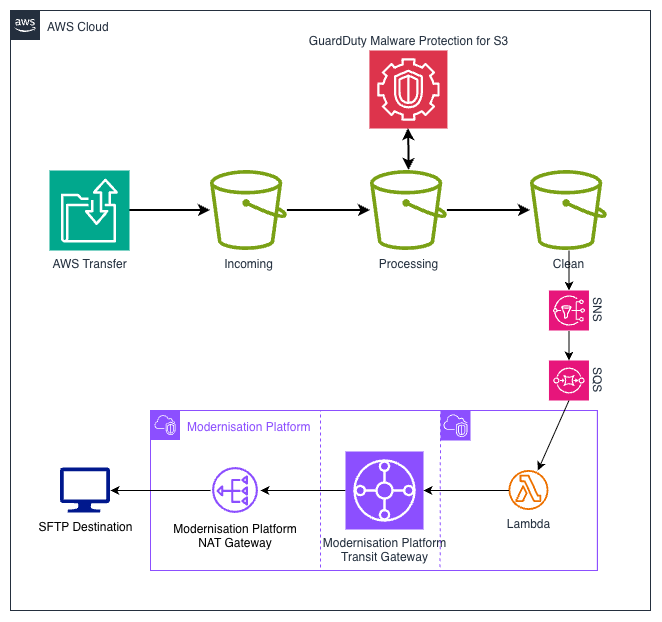
The existing file-transfer journey stays the same until a file is confirmed as clean. For more detail, see how files move through the file transfer service.
For this pattern, the push-to-sftp action will then:
- route a matching event through the Integration Hub SNS > SQS > Lambda that serves this pattern
- use a managed function and delivery role to copy the file
- replace your Integration Hub source prefix with the destination directory you requested
- deliver the file to the SFTP server
The Integration Hub will manage the notification services, queue, function and delivery role.
For example, if your Integration Hub source prefix is customer-prefix and you
request incoming as the destination directory:
customer-prefix/reports/example-file.txtwill becomeincoming/reports/example-file.txton the destination server.
What your service provides
The Integration Hub will provide an SSH client public key for your transfer. Ask the destination server’s administrator to install it on the account that will receive the files.
Provide the Integration Hub team with the server’s hostname, port, account username and destination directory. The server must allow connections from the Integration Hub.
You will also need to provide the server’s public host key through a separate, trusted channel. The Integration Hub uses it to check the server’s identity before connecting.
The destination directory must already exist. The account needs permission to upload and rename files and create any subdirectories below it.
A delivery can overwrite an existing file at the same destination path, including when a failed transfer is retried.
Discuss this pattern
This pattern is still in design. To discuss whether it is suitable for your
service, post in #ask-integration-hub with:
- the service that will send files to the Integration Hub
- who owns the destination SFTP server
- the destination server’s hostname, port and account username
- the destination directory you want to use
- your Integration Hub source prefix
- your expected file volume, size and delivery frequency
Do not include passwords, private keys, file contents or other sensitive data.
Getting help
For a question about this draft pattern, post in #ask-integration-hub.
Include the destination server, environment and a description of the issue.