Push to S3
This is a draft supported pattern. The file transfer service can already receive, scan and route clean files. Delivery to a customer-owned S3 bucket is not yet available to customers.
Push to S3 is a planned way for the Integration Hub to deliver your processed files to an S3 bucket that your service owns in an AWS account you administer.
Use this pattern when your service wants to receive files in its own S3 bucket.
How the pattern works
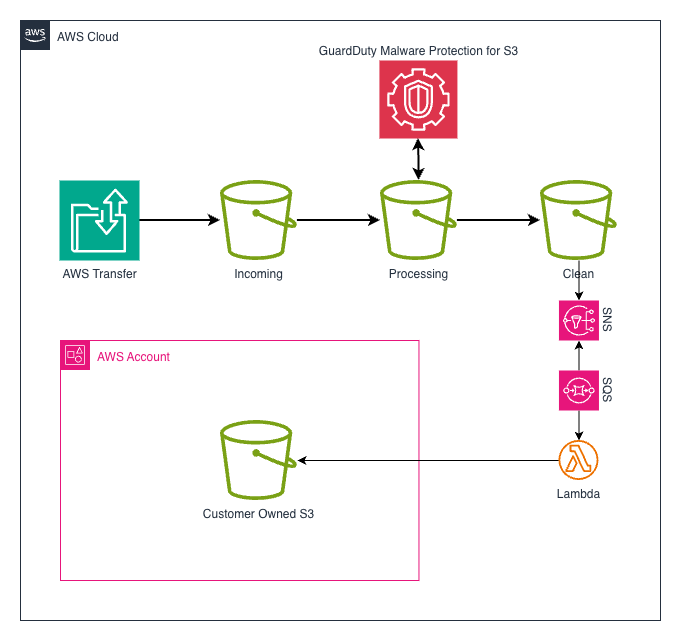
The existing file-transfer journey stays the same until a file is confirmed as clean. For more detail, see how files move through the file transfer service.
For this pattern, the clean-file action will then:
- route a matching event through the Integration Hub SNS > SQS > Lambda that serves this pattern
- use a managed function and delivery role to copy the file
- replace your Integration Hub source prefix with the destination prefix you requested
- deliver the file to your S3 bucket
The Integration Hub will manage the notification services, queue, function and delivery role. Your service will manage the destination bucket and control who can access its files.
For example, if your Integration Hub source prefix is customer-prefix and you
request bag-end as the destination prefix:
customer-prefix/reports/example-file.txtwill becomebag-end/reports/example-file.txtin your bucket.
What your service provides
The Integration Hub will provide the Amazon Resource Name (ARN) of its delivery role. Your team must configure the destination bucket and its customer-managed AWS Key Management Service (KMS) key to trust this role.
The bucket policy needs to allow the delivery role to put objects under the agreed destination prefix. It does not need to give the role permission to read, list or delete your objects.
Replace the example values in this bucket policy with the role ARN, bucket name and destination prefix agreed during setup:
{
   "Version": "2012-10-17",
   "Statement": [
      {
         "Sid": "AllowIntegrationHubDelivery",
         "Effect": "Allow",
         "Principal": {
            "AWS": "INTEGRATION_HUB_DELIVERY_ROLE_ARN"
         },
         "Action": [
            "s3:PutObject",
            "s3:AbortMultipartUpload",
            "s3:ListMultipartUploadParts"
         ],
         "Resource": "arn:aws:s3:::DESTINATION_BUCKET/DESTINATION_PREFIX/*"
      }
   ]
}
Your KMS key policy must also allow the delivery role to encrypt objects. Add a statement like this to your existing key policy. It includes the permissions needed if a large file uses multipart copy:
{
   "Sid": "AllowIntegrationHubDelivery",
   "Effect": "Allow",
   "Principal": {
      "AWS": "INTEGRATION_HUB_DELIVERY_ROLE_ARN"
   },
   "Action": [
      "kms:Encrypt",
      "kms:GenerateDataKey*",
      "kms:Decrypt"
   ],
   "Resource": "*"
}
Keep encryption at rest and Block Public Access enabled on your destination bucket. Your service owns the bucket’s lifecycle and retention configuration, as well as its S3 storage, request, data-transfer and KMS costs.
Discuss this pattern
This pattern is still in design. To discuss whether it is suitable for your
service, post in #ask-integration-hub with:
- the service that will send files to the Integration Hub
- the service that owns the destination bucket
- the destination AWS account ID, S3 bucket name and AWS Region
- the destination prefix you want to use
- the ARN of your customer-managed KMS key
- the environment you need, such as development or production
- your expected file volume, size and delivery frequency
- a technical contact who can update the bucket and KMS key policies
Do not include passwords, private keys, file contents or other sensitive data.
Getting help
For a question about this draft pattern, post in #ask-integration-hub.
Include the destination bucket, environment and a description of the issue.