Collect files through the portal
This is a draft supported pattern. Development configuration exists, but live access checks and customer availability still need to be confirmed. Check with the Integration Hub team before planning to use it.
This pattern is for people who need to collect files in a browser. When a clean file is ready, the Integration Hub sends a Slack notification with a link to the file transfer portal.
Use this pattern when people need to download files themselves, rather than have them delivered directly to a service.
How the pattern works
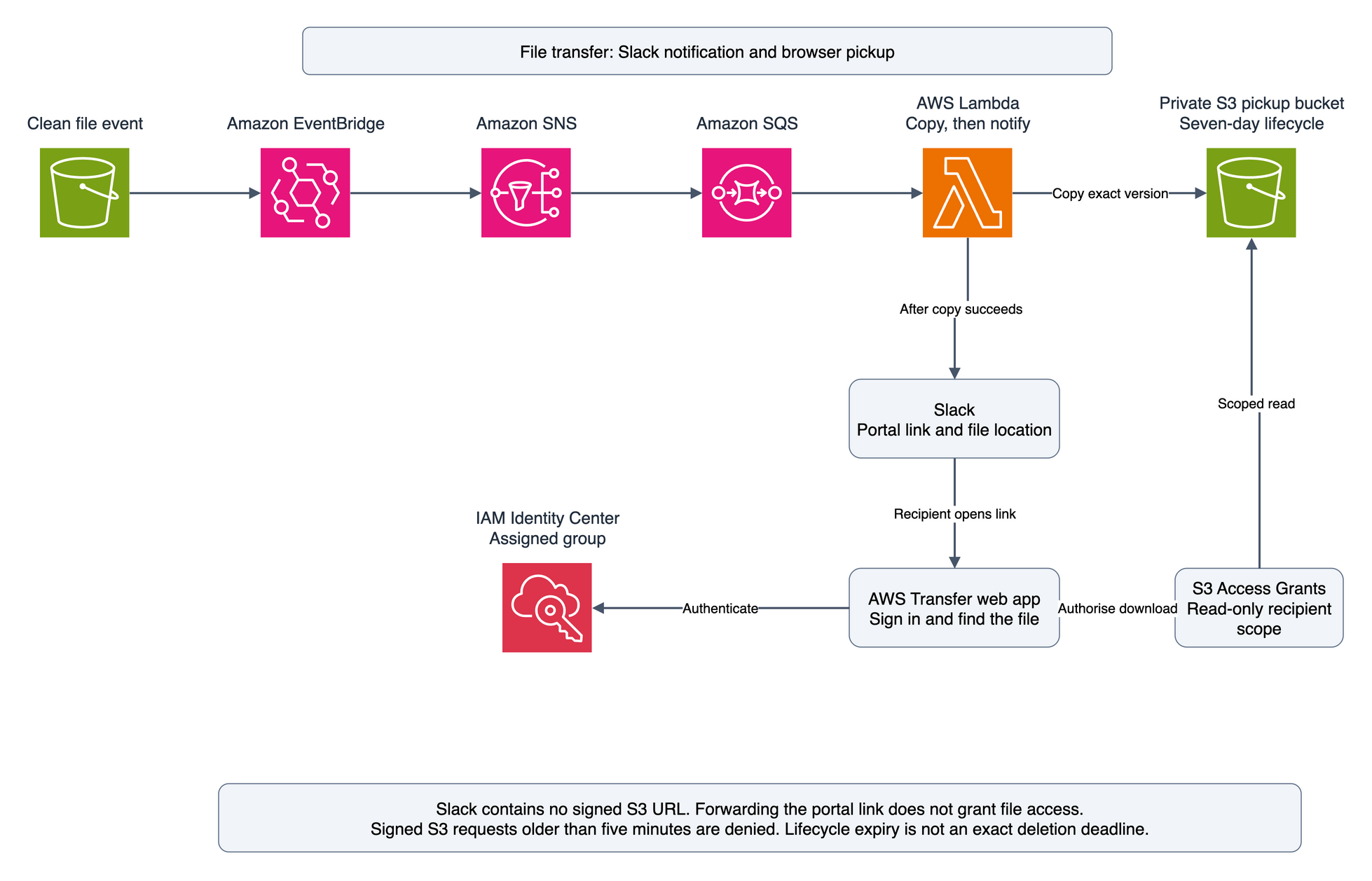
After a file passes its malware scan, the Integration Hub copies it to a private pickup area. The original clean file remains in the clean area, subject to its usual retention policy.
The Slack notification contains the file name, its pickup path and a link to
the portal. Spaces and special characters in the message may appear as codes,
such as %20 for a space. The link opens the portal, not the file itself.
To collect a file:
- Open the portal using the link in the Slack notification.
- Sign in with your organisational account.
- Use the pickup path in the notification to find and download the file.
Only members of an authorised group can access the pickup area. Receiving or forwarding the Slack message does not grant access. Access to the pickup folder is read-only.
How long you have to collect files
Collect files within seven days. The pickup area has a seven-day expiry rule, but removal is asynchronous, so this is not an exact deletion or access cutoff. Tell the Integration Hub team if you need a strict deadline.
Keep downloaded files in line with your service’s own retention requirements.
Discuss this pattern
To discuss whether this draft pattern is suitable for your service, post in
#ask-integration-hub with:
- the service that will send the files
- the service and people who will collect them
- the environment and source prefix you need
- the group that needs access and the Slack channel for notifications
- your expected file sizes, volume and collection frequency
- your retention requirements
Do not include file contents, passwords, private keys or other sensitive data.
Getting help
If you cannot find or download a file, contact #ask-integration-hub. Include
the environment, approximate upload time and a description of the problem.
Do not share file contents or credentials.